
RF Guru

RF Guru: The Professional Wireless Management Creator
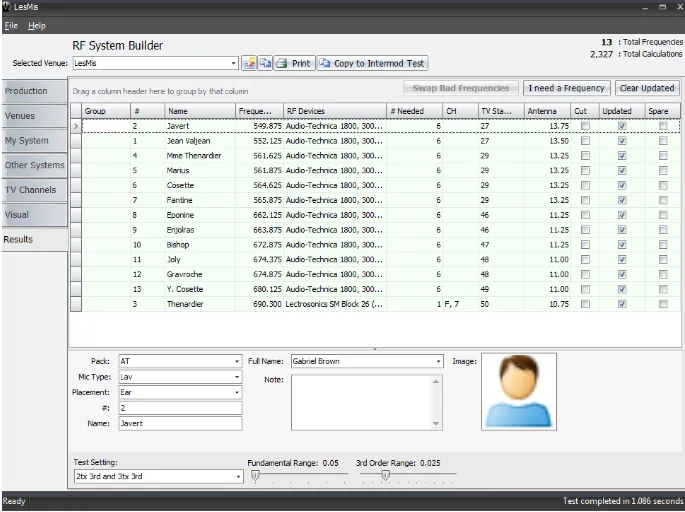
RF Guru is a specialized frequency creator that enables anyone to build a stable wireless environment for film and live production. Its smart interface lets you bring scripts to life by ensuring every wireless microphone and intercom channel stays crystal clear, streamlining the creative process for sound mixers and RF technicians on the Windows platform.
Why Use RF Guru for Your Next Project?
Sound departments often ask: is RF Guru free? The software is a free resource that provides professional-level coordination without an upfront cost. It serves as a vital technical guide, ensuring you stay on schedule and on time by calculating complex intermodulation equations to prevent signal dropouts during critical takes.
Key Features:
- Intermodulation Analysis: Automatically calculates interference to find the cleanest possible channels.
- Global Equipment Library: Access a massive database of wireless gear from major manufacturers like Shure and Sennheiser.
- Zip Code Coordination: Input your location to instantly see local TV station interference and avoid busy bands.
- Scan Import: Import frequency scans from external hardware to visualize the real-world RF environment.
How to Use RF Guru for Film and Live Sound
Learning how to use RF Guru is simple: enter your wireless inventory and your project’s location to generate a conflict-free frequency map.
- Inventory: Add all your wireless devices to the list to see how their frequencies interact.
- Coordination: Click “Calculate” to let the engine find safe “zones” for every transmitter on set.
- Reports: Export a clean PDF of your frequency plot to share with the entire sound team.
Version Comparison
- Free Version: Complete access to coordination, intermodulation calculations, and equipment libraries.
- RF Scanner Plugin: Optional paid add-on for direct, real-time integration with spectrum analyzer hardware.
Reviews
No reviews yet